 wowMath
The tablet grades.
You cheer them on.
Paper math worksheets, now on a tablet. Your child writes each answer with a stylus, and AI running on the tablet itself circles the right ones and slashes the wrong ones. No internet or sign-up needed.
Android tablets · iPad · Free · No ads · App currently in Korean only
What wowMath does
- Write with a stylus, as on paperYour child writes the answers in the worksheet boxes with a stylus. Name and date fill in on their own, and the timer pauses during breaks and resumes after.
- Graded right on the deviceA small digit-recognition model on the device reads the handwriting. Nothing is sent to a server, so it works without internet.
- Not sure? It draws a triangleWhen writing is hard to read, it draws a blue triangle instead of a red slash, so a correct answer doesn’t get slashed by mistake.
- Redo only what was wrongOnly the wrong and blank problems open again. The first score stays on record, and the next sheet opens once every answer is right.
- Gets used to your child’s writingIt reads each digit by comparing it with ones your child wrote before. No retraining needed. It adapts to their writing habits right on the device.
How one sheet goes
CNo. 12NameEmmaScore9 + 8 =7 + 6 =8 + 5 =6 + 9 =7 + 7 =9 + 4 =Write each answer in its box with the stylus. Name and date fill in on their own.
- CNo. 12NameEmmaScoreI’m done9 + 8 =177 + 6 =128 + 5 =136 + 9 =157 + 7 =149 + 4 =1ʒ
Finished? Tap “I’m done.” If anything’s left blank, it lets you know first.
- CNo. 12NameEmmaScore809 + 8 =177 + 6 =128 + 5 =136 + 9 =157 + 7 =149 + 4 =1ʒ
It grades the way a teacher would. Unclear writing gets a triangle.
- CNo. 12NameEmmaScore801009 + 8 =177 + 6 =
12138 + 5 =136 + 9 =157 + 7 =149 + 4 =13Rewrite only the wrong ones. Get them all right for a 100 stamp.
The real app
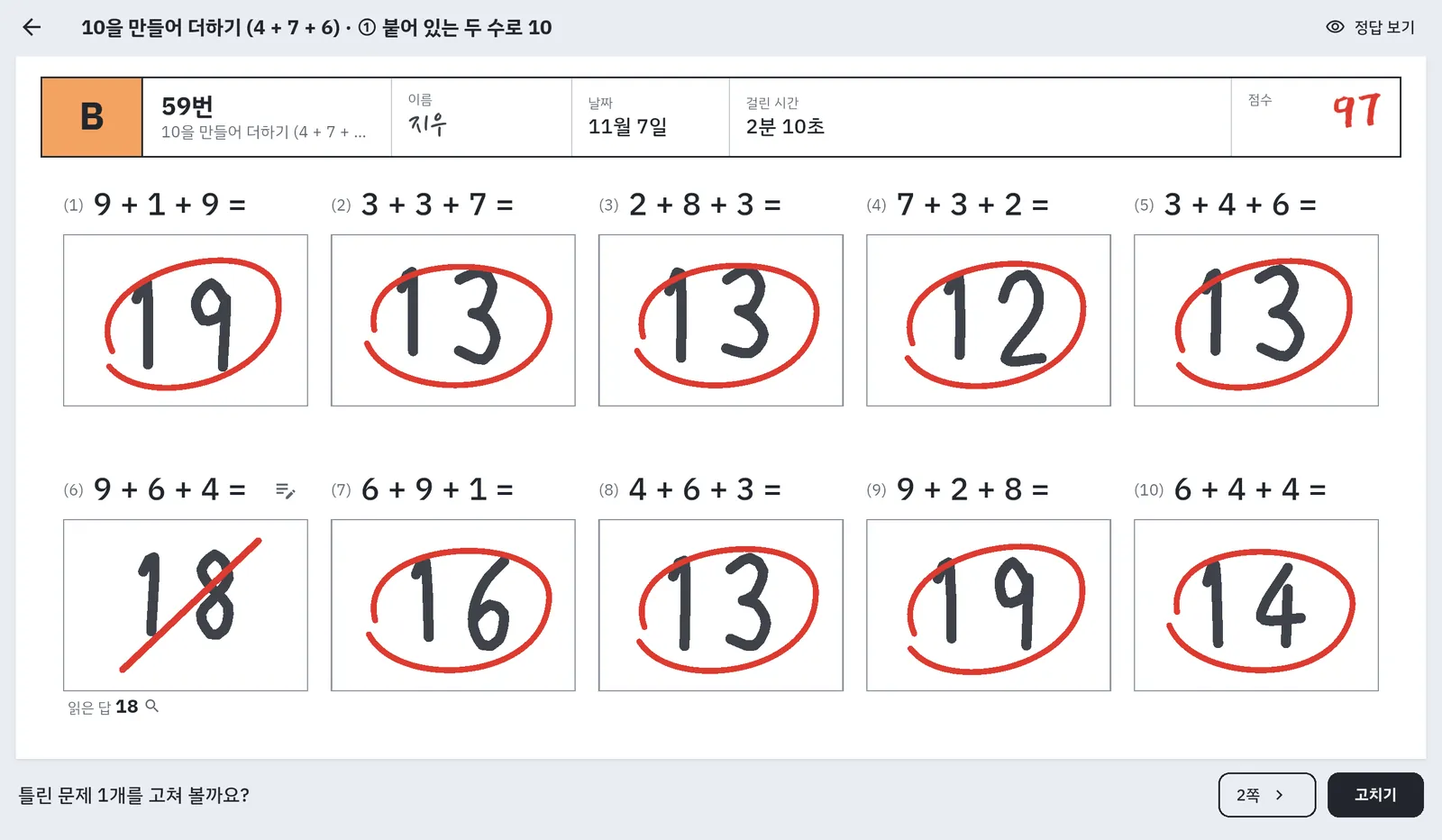
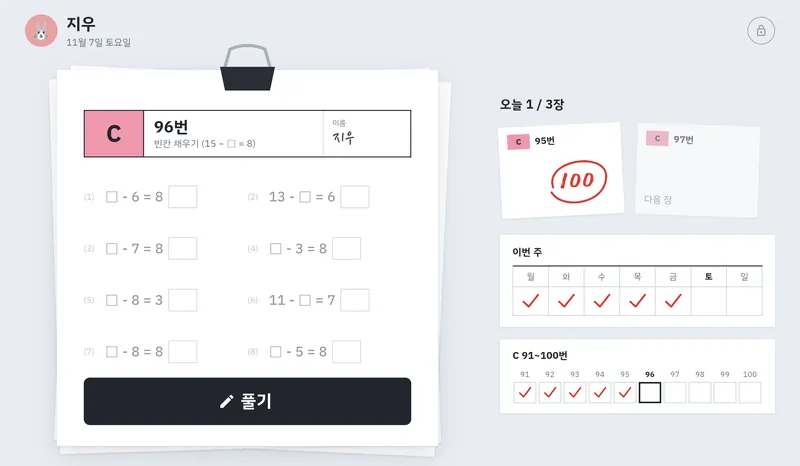
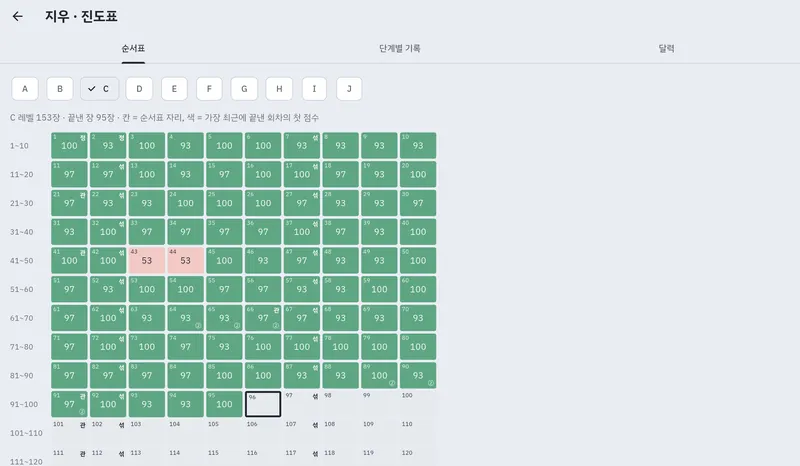
Real app screens, captured on an emulator with sample records and a sample name. The app is in Korean for now.
From A
to J
926 sheets
Sheets from Level A to J, even on the fastest path
23,624
Problems in those 926 sheets
- AIntro to addition
- BIntro to subtraction
- CMental addition and subtraction
- DColumn addition and subtraction
- ETimes tables
- FDivision basics
- GLong multiplication
- HLong division
- IMixed operations
- JFractions
Levels follow arithmetic difficulty, not school grade, because kids in the same grade can be in very different places. At the start, one sheet finds where your child fits. From then on, the app hands out each day’s sheets in order.
Each stage has practice sheets and one final checkpoint sheet. A first-try score of 90 or higher on it moves your child to the next stage. New learners start at the standard pace (3 sheets a day for A–F, 2 a day for G–J), and you can switch to “Keep going” (계속 풀기) or “Set sheets per day” (하루 정한 장 수).
What level is this problem?
Type in a problem to see how it would look on a wowMath worksheet. Parentheses and fractions (3/4 + 1/8) work too.
The parent area
stays locked
Progress chart and answers to check
Each sheet’s first score fills in a box with color. For answers marked with a triangle, you decide right or wrong, and your decisions help the app read that child’s writing.
Reports and a teacher’s note
Simple rules find the kinds of problems your child often misses, and AI on the device (Gemma) writes you a one-paragraph note. You download the model (2.6GB) just once, and only if you want it. Sentences with numbers that aren’t in the records are left out.
Several kids, new devices
Each child gets their own profile and level. When you switch devices, export the records to a file and import it on the new one to pick up where your child left off.
Handwriting stays
on the device
There’s no sign-up, and we didn’t add ads or analytics tools. Here is plainly what is kept where.
Kept only on the device
4- Child profile
A name (a nickname is plenty), the animal picture they chose, and their level. The app doesn’t ask for a birth date, grade, or photo.
- Learning records
Answers, score, and time taken for each sheet.
- Handwriting strokes
The strokes your child writes. Used only for grading and for reading that child’s writing better.
- AI keys and sign-ins
Kept only in the device’s secure storage (Keystore, Keychain), and left out of backup files.
Only two times it goes online
2- Teacher’s note model
Downloaded from Hugging Face only when you choose to download it. No information about your child is sent.
- External AI (only if you choose it)
If you choose an external AI such as ChatGPT, only the learning summary needed for the note is sent. Your child’s name is replaced with the placeholder [아이] (Korean for “child”), and the first time you choose one, the app shows you what goes where.
The full details are in the Privacy Policy.
Read the Privacy Policy →Frequently asked questions
Is it free?
Yes. The app is free, with no ads or payments. If you choose an external AI, only that company’s fees are charged, to your own account.
Does it need the internet?
No. Doing worksheets, grading, and the progress chart all work offline. It goes online only to download the teacher’s note model or to use an external AI.
Which devices does it work on?
Android tablets and iPad (iPadOS 16 or later). A stylus works best. For the on-device teacher’s note, which models you can choose depends on the device’s memory.
Can my child write with a finger?
Yes, fingers work too. But once a stylus is used, the app accepts only the stylus from then on, so a palm resting on the screen doesn’t leave stray lines.
What if it misreads the writing?
When it isn’t sure, it draws a blue triangle instead of a slash and leaves that answer out of the score. Your child can rewrite it first, or you can decide in the parent area under “Answers to check” (확인할 답).
I have two kids.
Make a profile for each child, so name, level, and progress are kept separate. They can take turns on one device.
What happens to the records if we switch devices?
On the old device, export from Parent › Backup (기록 백업). Then on the new device’s first screen, tap “I switched devices” (기기를 바꿨어요) and import.
Today’s sheets,
one at a time.
wowMath is coming soon to Google Play and the App Store. It’s free, with no ads.